Rabbit R1 hands-on: Already more fun and accessible than the Humane AI PinIt has a working, reliable screen and easy-to-use controls.By C. Low, a day ago
The world's leading AI companies pledge to protect the safety of children onlineBy P. Dixit, 04.23.2024
Samsung's Galaxy S24 Ultra is on sale for its lowest price yet at Amazon and Best BuyBy A. Skorheim, 04.23.2024
The world's leading AI companies pledge to protect the safety of children onlineBy P. Dixit, 04.23.2024
Samsung's Galaxy S24 Ultra is on sale for its lowest price yet at Amazon and Best BuyBy A. Skorheim, 04.23.2024
Spotify tests Apple's resolve with new pricing update in the EUApple is in hot water with the EU for self-preferencing. By S. Fielding, an hour ago
Garry’s Mod faces deluge of Nintendo-related DMCA takedown noticesIt says it will address the requests despite suggestions they didn't come from Nintendo.By M. Moon, 2 hours ago
The best gifts for teachersFrom digital frames to cold-brew accessories, these are items any educator would appreciate.By Engadget, 2 hours ago
The Morning After: Testing the Rabbit R1's AI assistant skillsOur early impressions ahead of a full review.By M. Smith, 3 hours ago
Adobe's new upscaling tech uses AI to sharpen videoVideoGigaGAN can enhance sharpness 8 times with fewer artifacts than before. By S. Dent, 4 hours ago
The best MacBook accessories for 2024Step up your laptop’s game with these handy gadgets.By V. Palladino, A. Skorheim, 5 hours ago
Manhattan's DA wants to know why YouTube is pushing 'ghost gun' tutorials to kidsYouTube has apparently been recommending gun-making videos to kids watching video game content. By M. Moon, 7 hours ago
Threads has 150 million monthly usersMark Zuckerberg has speculated it could be Meta's next billion-user app.By K. Bell, 16 hours ago
TikTok Lite axes ‘addictive as cigarettes’ reward-to-watch feature under the EU’s watchful eyeThe Digital Services Act’s regulatory muscles effectively forced the suspension.By W. Shanklin, 17 hours ago
PUBG will take a nostalgia-infused trip back to its first map in MayErangel Classic blends the “charmingly tacky” elements of the original with modern gameplay improvements.By W. Shanklin, 18 hours ago
JetBlue's in-flight entertainment system just got a watch party featureThe new platform also offers content recommendations and lets customers pick up from where they left off during a previous trip. By L. Bonk, 19 hours ago
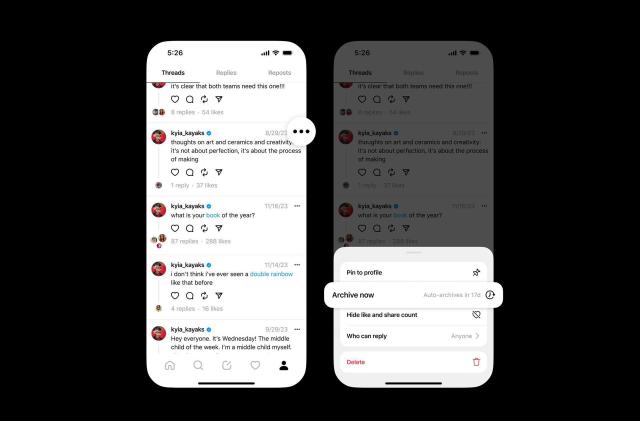
Threads is testing automatic archiving for postsThe feature will be optional.By K. Bell, 19 hours ago
WhatsApp is enabling passkey support on iOSYou'll soon be able to log in without an SMS passcode.By K. Holt, 20 hours ago
The White House wants a zero-emission freight industry by 2040It aims for 30 percent of the industry’s heavy truck sales to produce zero carbon emissions by 2030.By W. Shanklin, 20 hours ago
PBS Retro is a new FAST channel playing just the classicsIt offers 24/7 access to shows like Mister Rogers’ Neighborhood, Reading Rainbow and Zoboomafoo.By L. Bonk, 21 hours ago
Rabbit R1 hands-on: Already more fun and accessible than the Humane AI PinIt has a working, reliable screen and easy-to-use controls.By C. Low, a day ago
Google has delayed killing third-party cookies from Chrome (again)Now the company says it’ll happen next year.By L. Bonk, a day ago
Joe Biden signs the bill that could ban TikTok in the United StatesThe company has called the law “unconstitutional.” By K. Bell, a day ago
Steam closes an early-access loophole in its refund policyAlmost any time played before a game’s release date now counts towards the two-hour limit. By K. Holt, a day ago